Work SampleSystem Design Document
Order Risk Hold for Imported Shopify Orders
Fraudulent orders reach the warehouse because the ERP never sees Shopify's risk verdict. This document specifies how the ERP stores that verdict, holds risky orders from delivery and records who released them and why.
1.1The Problem
Shopify runs a fraud analysis on every order and returns a risk assessment with a recommendation: accept, investigate or cancel. That output stops at Shopify. The ERP imports the order every 10 minutes with no risk data attached, so the sales manager sees a normal Sales Order and can ship it.
This costs the business twice:
- Goods leave the warehouse on orders that are later charged back. The company loses the stock, the shipping cost and the card amount.
- Nobody can say who released a suspicious order and why, so chargeback disputes cannot be reconstructed.
The risk information already exists at the moment of import. The ERP does not store it and does not act on it.
1.2Four Scenarios the Design Has to Handle
SCENARIO 1
High Risk Order Ships Today
Three cameras, EUR 2,480, a card issued in a different country from the shipping address. Shopify says cancel. The order imports as Open, ships the same afternoon, and the chargeback arrives four weeks later.
SCENARIO 2
Medium Risk, No Signal
Shopify recommends investigating. In the ERP the order looks like every other order, so nobody calls the customer.
SCENARIO 3
Legitimate Customer Flagged
A returning customer orders while travelling. The sales manager confirms by phone and needs to ship today. The control has to allow that and record who allowed it.
SCENARIO 4
Analysis Not Finished
The import runs before Shopify completes its analysis and the risk comes back as pending. The order must still import, and it must not be treated as safe.
1.3Requirements
Scope prioritised with MoSCoW. Twelve functional and four non-functional requirements, each with an ID that the acceptance criteria and tests trace back to.
| ID | Requirement | Priority |
|---|---|---|
| FR-01 | The import stores the Shopify risk assessments, the risk facts and the Shopify recommendation on the imported Sales Order. | Must |
| FR-02 | The ERP derives a single Risk Level per order from the assessments, using the highest severity returned. | Must |
| FR-03 | An order with Risk Level High or Medium is set to status Risk Hold at import. | Must |
| FR-04 | A user cannot create a shipment for an order on hold at High risk. | Must |
| FR-05 | A user can create a shipment for an order on hold at Medium risk after confirming a warning and entering a reason. | Must |
| FR-06 | Releasing a High risk hold requires the new Risk Override right. The release records user, timestamp and reason. | Must |
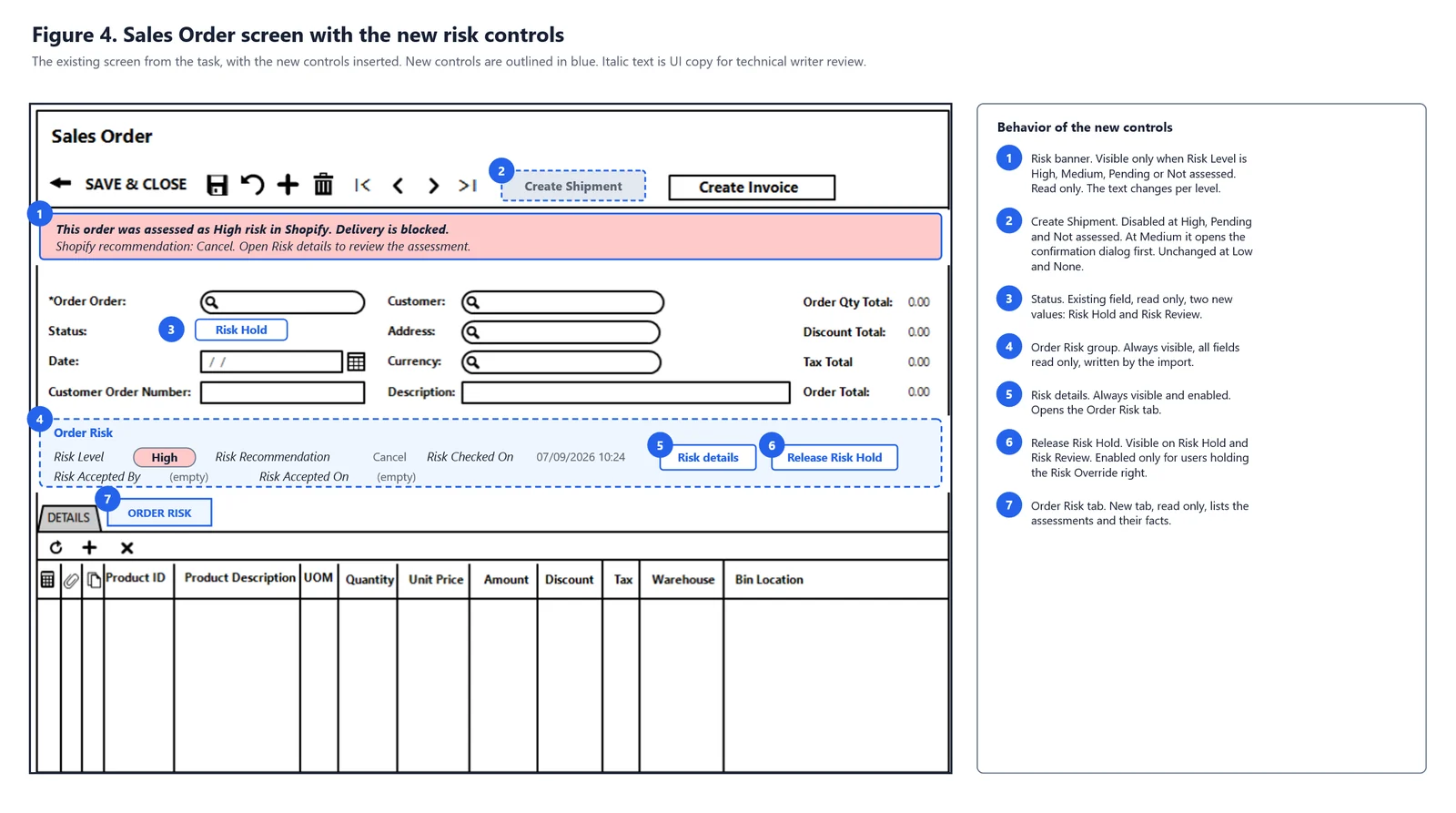
| FR-07 | Risk fields, assessments and facts are visible on the Sales Order screen, read only. | Must |
| FR-08 | An order whose risk is pending, missing or not recognised is imported, marked for review and blocked from delivery until the risk resolves. | Must |
| FR-09 | The restriction is enforced in the order service, so the API and any background job are subject to it, not only the screen. | Must |
| FR-10 | Risk hold behaviour is driven by settings: which levels hold, whether unknown risk blocks, and which right releases a hold. | Should |
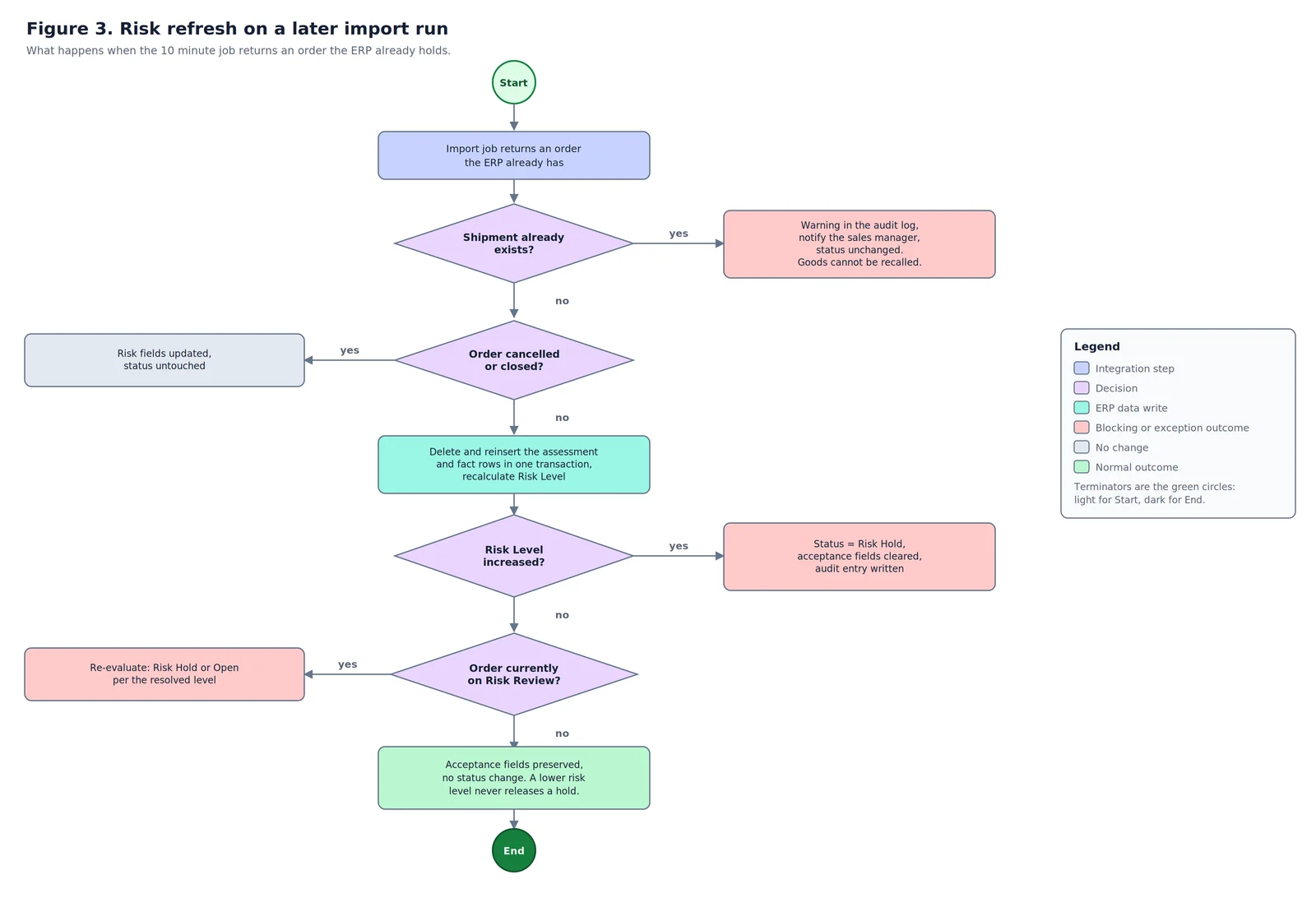
| FR-11 | A later risk update from Shopify re-evaluates an order that has not shipped yet. | Should |
| FR-12 | Orders imported before go-live are not held retroactively. | Must |
| ID | Requirement |
|---|---|
| NFR-01 | The risk evaluation adds no more than 10 percent to the import job's runtime at 1,000 orders per run, so the 10-minute schedule holds. |
| NFR-02 | No exception in risk mapping or persistence stops the import run or blocks the import of the order itself. |
| NFR-03 | Every hold release goes to the audit log with user, timestamp, previous and new status, and reason, retained for the chargeback dispute window. |
| NFR-04 | Risk state is communicated by text and label, not by colour alone. |
1.4The Solution in Brief
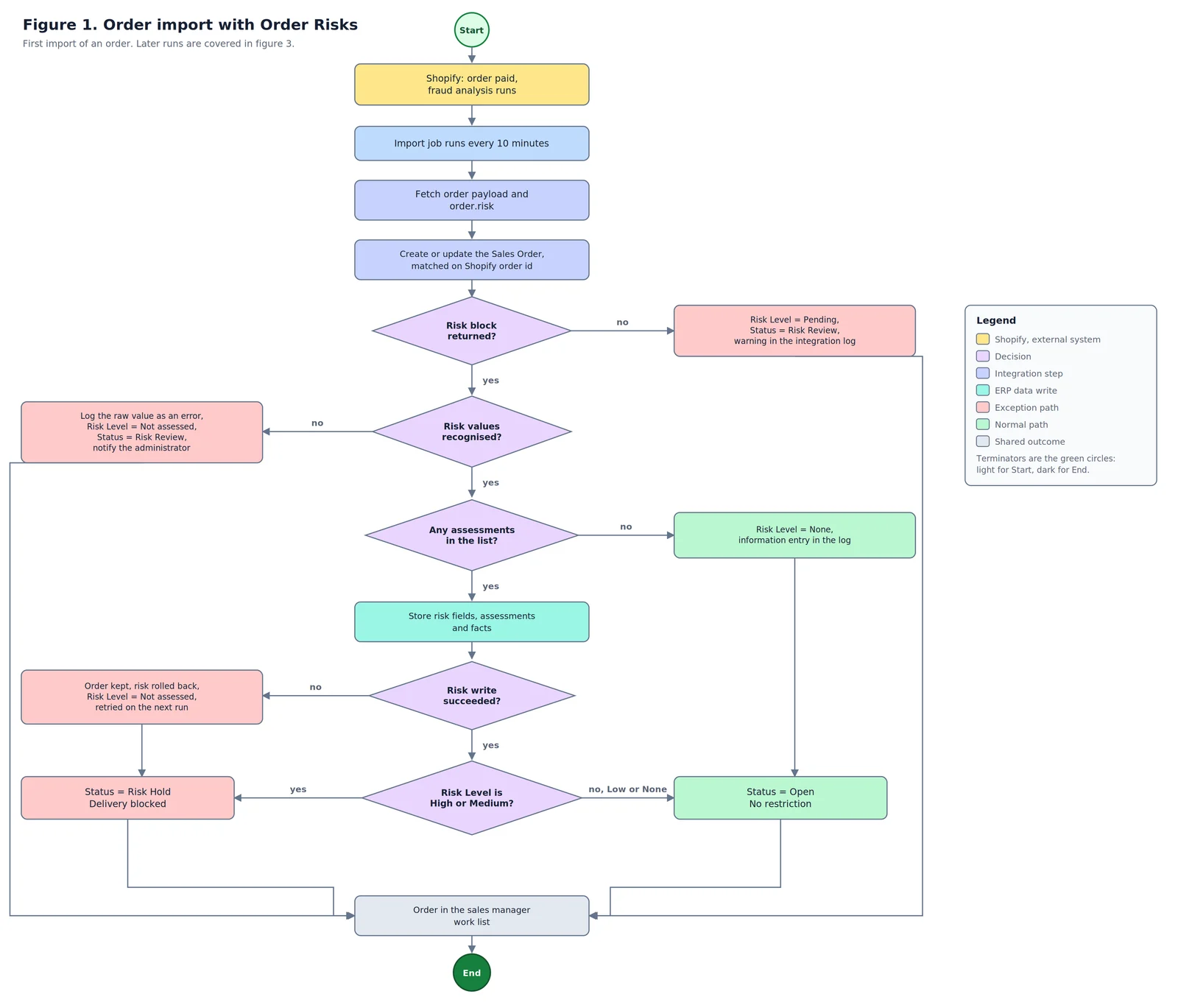
The import writes Shopify's risk data onto the Sales Order and checks it against the hold settings before the sales manager sees the order.
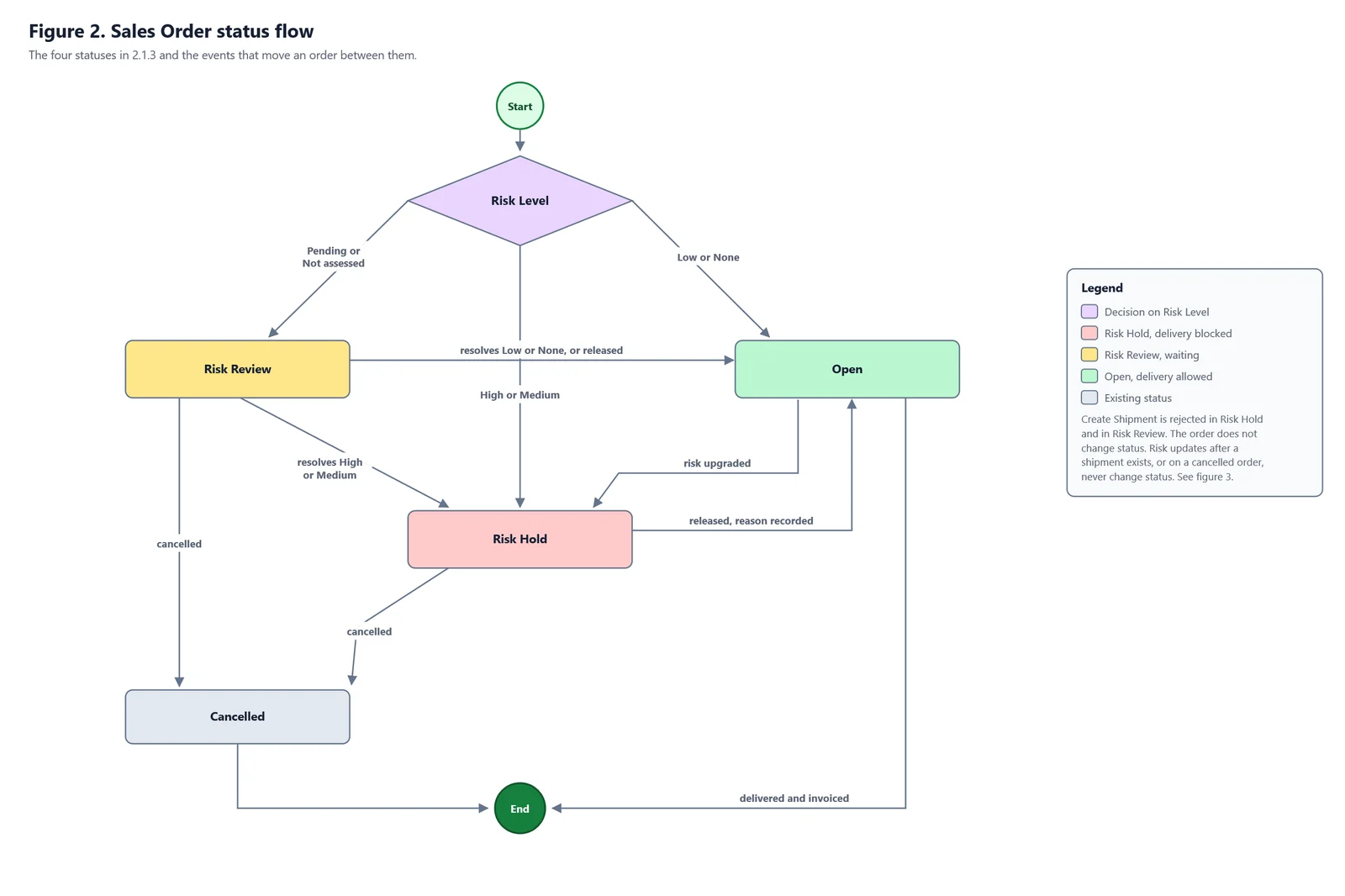
- High or Medium risk imports with status Risk Hold. Pending or unreadable risk imports with status Risk Review. Both block delivery. Everything else imports as Open and behaves as it does today.
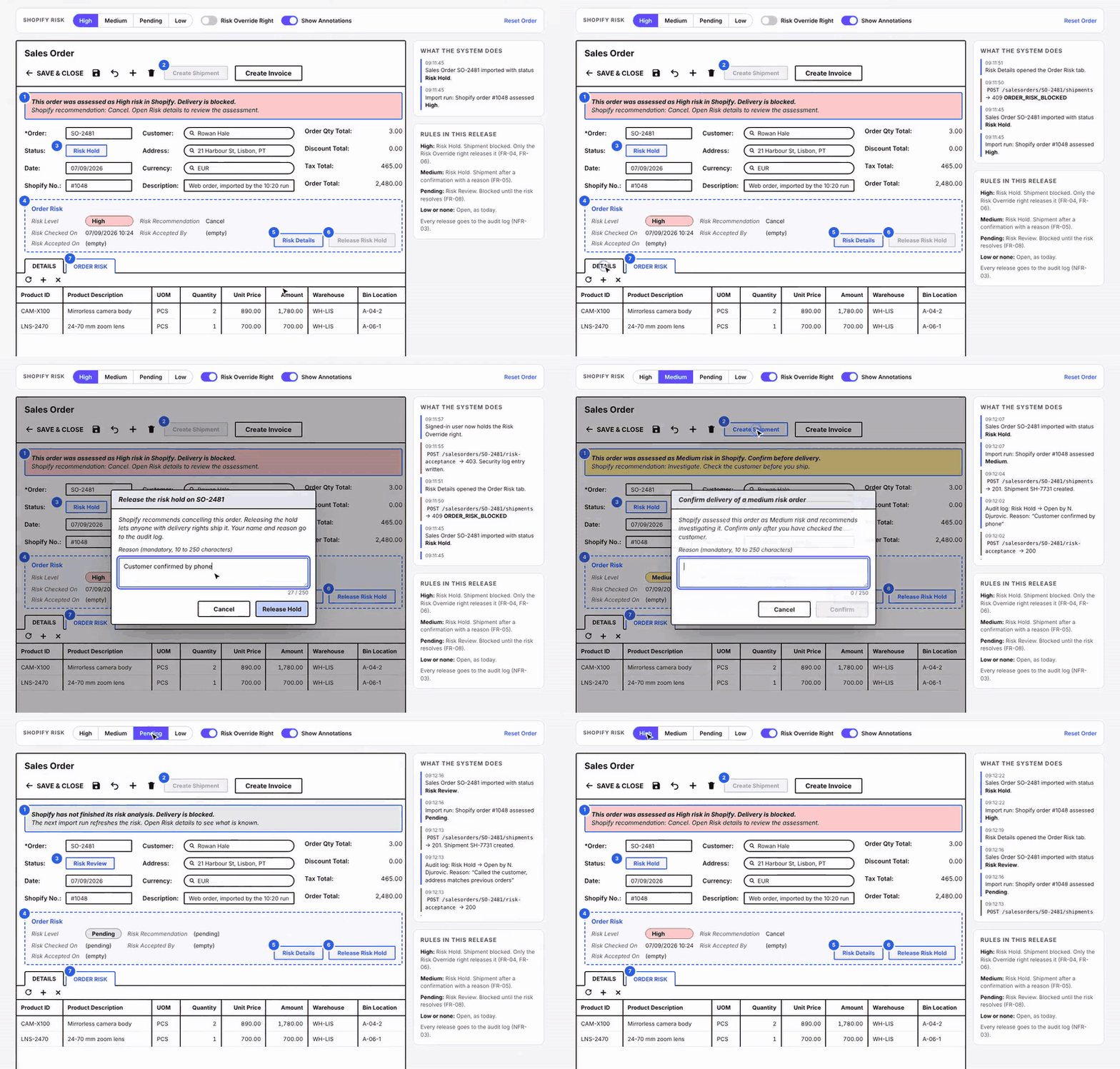
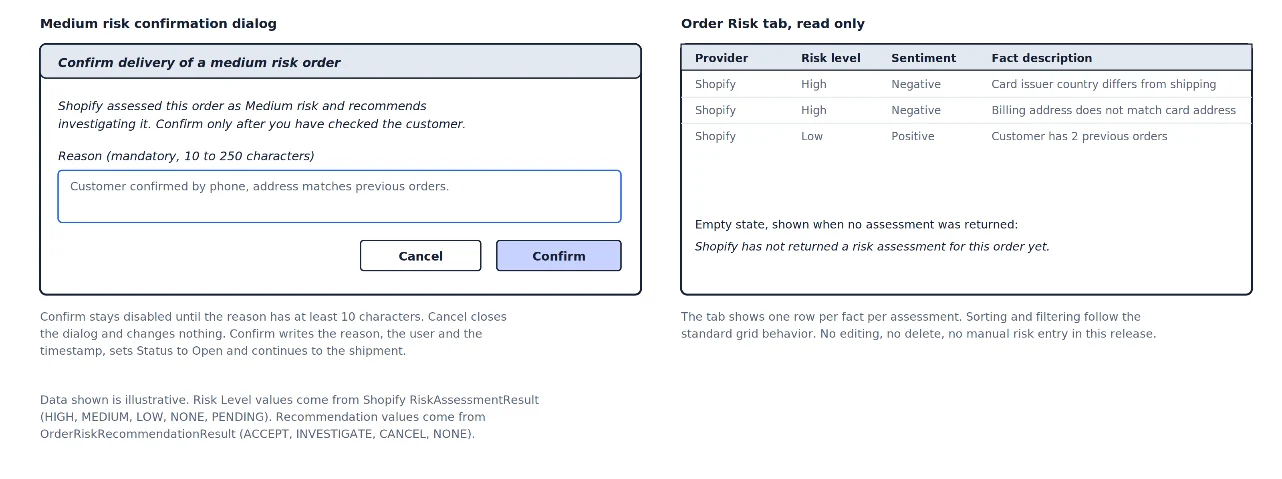
- At Medium risk, any user with delivery rights can confirm a warning and record a reason. That matches Shopify's advice to investigate.
- At High risk, only a user with the Risk Override right can release the hold. That matches Shopify's advice to cancel.
- The check sits in the order service, so the screen, the API and background jobs all get the same refusal.
Thresholds change with fraud patterns and the season, so hold levels live in settings. A go-live date setting keeps the open order book from freezing on release day.
2.1Diagrams
Each figure opens at full size. Colours follow one legend across the document, and every state is also labelled in text.
3Testing Strategy
The feature blocks money moving in one direction and lets a user override the block in the other. Testing weight goes on the rule engine, the permission check and the audit trail. The document defines 9 acceptance criteria, an automated test plan across unit, integration, API contract, performance and regression layers, and a manual plan that ends in UAT sign-off by the sales manager. Two of the acceptance criteria:
AC-02, positive. Medium risk order is delivered with a recorded reason Given an order has Risk Level = Medium and Status = Risk Hold, and the user has delivery rights When the user presses Create Shipment, enters “Customer confirmed by phone” and presses Confirm Then Status becomes Open, the acceptance fields and the reason are stored and shown, the shipment is created, and the audit log holds one entry with the previous status, the new status, the user and the reason
AC-06, negative. Release refused without the right Given an order has Risk Level = High and Status = Risk Hold, and the user does not hold the Risk Override right Then Release Risk Hold is disabled with an explanatory tooltip, a direct call to POST /salesorders/{id}/risk-acceptance returns 403 and writes a security log entry, and a direct call to POST /salesorders/{id}/shipments returns 409 ORDER_RISK_BLOCKED
What Else Is in the Full Document
- Field mapping from the Shopify Admin GraphQL risk objects to the ERP
- The rule that derives one Risk Level from several assessments
- Settings, exception handling and status effects per risk level
- UI copy for every banner, dialog, tooltip and empty state
- API endpoints with response codes, and the database changes
- Simplifications, limitations, bottlenecks and open questions
- Data examples in an appendix
Need a specification like this for your team? I take freelance B2B contracts with teams worldwide.