Case StudyOwn Product · Live
Synkbase.ai Currency: a Firefox Add-on, From Spec to Store
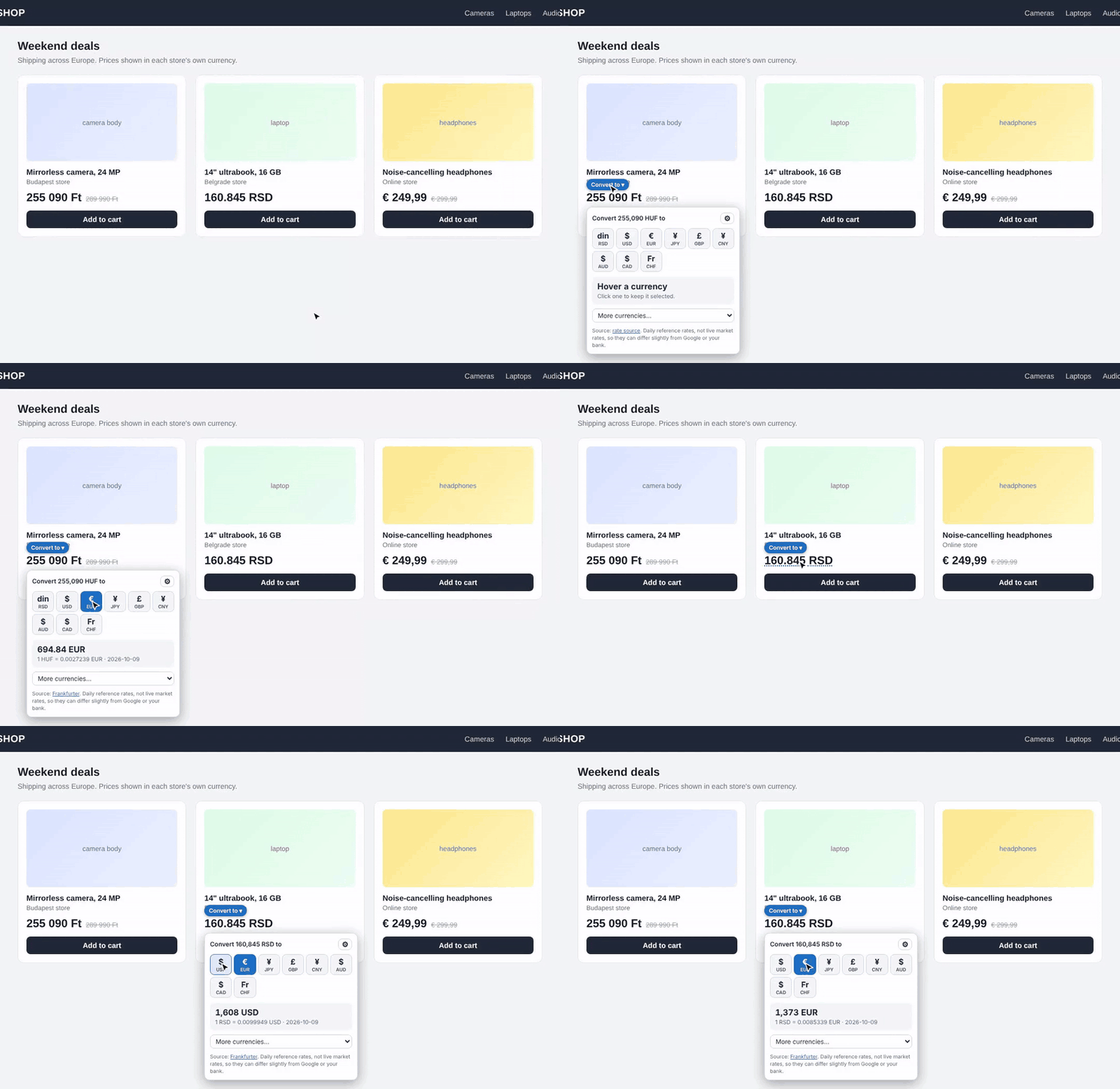
My own product. It shows any price on any website in your own currencies: hover a price on a computer, tap it on a phone. I own it end to end: requirements, product decisions, build, testing, release and the store listing.
- 191automated tests, all passing
- 62findings and decisions logged
- Noneuser data collected, as declared to Mozilla
- 46 KBpackage, desktop and Android
The Problem
Shopping on a foreign site means doing currency maths in a second tab. I wanted the converted price where I am reading it, on any shop, without sending my browsing to anyone's server.
The Requirements I Set
- Any website, whatever it is built with: plain HTML, React, Vue or web components.
- Only real prices. A number needs a currency marker. "Qty 5" and kilometres stay alone.
- Nothing about the user leaves the browser. No accounts, no analytics, no ads.
- Desktop and phone, each with an interaction that suits it.
- Honest numbers: every result names its rate source and says the rates are daily, not live.
What It Does
- 47 currencies, yours first. The starting list is your own currency, worked out on the device from the time zone, then the eight most traded. No location lookup.
- Hover on a computer, tap on a phone. One package. The layout follows whether the device has a mouse.
- Shared symbols read in context. "$", "kr" and "¥" are resolved from the site's domain and language first, so a .ca shop means Canadian dollars, then from your setting.
- Off for one site or everywhere, from the toolbar button. Search engines, webmail, work tools and payment pages are excluded from the start.
- Settings follow you to your other devices through Firefox Sync, when you use it.
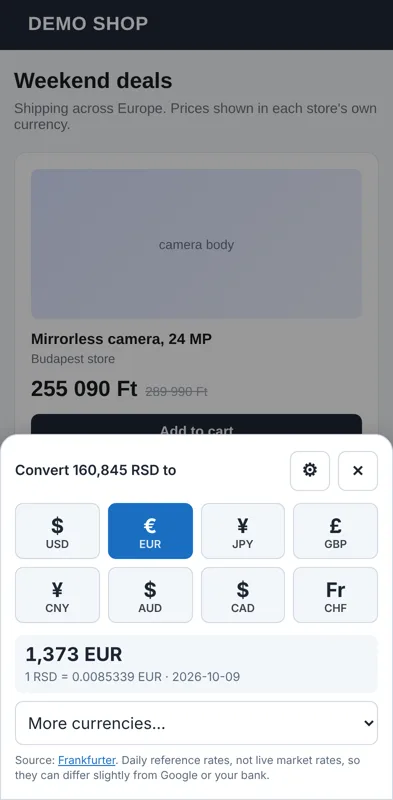
- Every result names its rate, date and source.
Stack
Plain JavaScript on the WebExtensions API. No framework, no build step, no minification.
- Platform
- Firefox WebExtension, Manifest V2. Firefox 115+ on desktop, 120+ on Android.
- Reading the page
- TreeWalker over visible text, DOM Ranges as pointers to each price, MutationObserver for pages that change, CSS Custom Highlight API for the underline.
- Overlay
- One custom element with a closed Shadow DOM and inline styles. Page CSS cannot reach it, and it never edits the page's markup.
- Background
- Non-persistent event page. Fetches the euro rate table, caches it for an hour and works out every currency pair.
- Storage
- storage.local for the rate table and a copy of settings, storage.sync for settings across devices.
- Rates
- Frankfurter API (central-bank reference rates), with ExchangeRate-API's open endpoint for currencies Frankfurter does not publish.
- Testing
- 191 tests on Node with jsdom: detection, overlay, phone flow, settings sync, rates and the off switch.
- Release
- web-ext lint (0 errors, warnings, notices) and web-ext build for the store package. 46 KB.
How It Works
Four scripts run in each tab, one in the background, and two public rate services sit outside. Nothing else is involved.
Finding a Price Without Touching the Page
- Walk the visible text. Skips scripts, inputs, code blocks and anything editable. Stops at 60,000 nodes.
- Join split prices. "€", "12" and a raised "99" in three elements are read as one price.
- Match a marker and a number. No currency marker, no price, so "Qty 5" stays alone. "KM" counts as marks only on Bosnian sites.
- Resolve shared markers. "$", "kr" and "¥" from the domain, then the page language, then your setting.
- Parse the amount. A separator followed by exactly three digits is a thousands separator, whatever the character.
- Keep a Range, not a copy. Up to 800 prices per page, re-checked when the page changes.
API Specification
The parts talk through WebExtensions messaging. Every handler checks that the sender is the extension itself and ignores anything else.
Internal Messages
| Message | From → To | Request | Response |
|---|---|---|---|
getRates | Overlay → background | { type: "getRates", base: "HUF" }base must be a three-letter ISO 4217 code | { ok: true, base, date, rates, sources, stale }or { ok: false, error } |
clearCache | Popup → background | { type: "clearCache" } | { ok: true, cleared: 1 } |
synk:site | Popup → content script of the active tab | { type: "synk:site" } | { host: "shop.example.rs", off: false } |
// getRates("HUF"), success
{
  "ok": true,
  "base": "HUF",
  "date": "2026-10-09",
  "rates":   { "EUR": 0.00272, "USD": 0.00297, "RSD": 0.319, ... },
  "sources": { "EUR": "frankfurter", "USD": "frankfurter", "RSD": "erapi", ... },
  "stale": false        // true when the last good table is served offline
}

// errors: "bad currency" | "no rate for XXX" | "no rate source reachable"
{ "ok": false, "error": "bad currency" }
Rates in the example are illustrative.
Outbound Requests
| Endpoint | When | Payload used |
|---|---|---|
GET https://api.frankfurter.dev/v2/rates?base=EUR | No rate table yet, or it is older than one hour | Rows of { date, base, quote, rate }. Only the newest date is kept. |
GET https://open.er-api.com/v6/latest/EUR | Frankfurter is down or lacks a currency | { base_code, rates, time_last_update_utc }, rebased to EUR if needed |
Both calls send no cookies, skip the HTTP cache and time out after 8 seconds. If both fail, the last good table is used and marked stale. The base is always EUR, so the request is the same for every user and every page.
Stored Data
| Key | Where | Fields |
|---|---|---|
settings | sync and local | enabled, favourites (up to 12), favouritesEdited, dollar / krona / yen (how to read "$", "kr", "¥"), theme, layout, lastTarget, offSites (up to 200). Every read is validated against the allowed values. |
rates:EUR | local | at, date, rates, sources. Reused for one hour. |
fabPos | local | Where you left the phone tab on the screen edge. |
Six Decisions That Shaped It
Each one came from a finding in the decision log I kept from the first build. The log has 62 entries.
v0.3 → v0.4replaced, not patched
Float Above the Page, Never Edit It
The first version wrote buttons into the page text. On React shops the framework re-rendered the text and prices appeared twice. Patching that was a losing game, so I had it rebuilt as one layer floating above the page. The page's own markup is never touched, so no framework can break it or be broken by it.
1000×error caught before launch
Wrong Numbers Are Worse Than No Numbers
A Serbian shop showed "160.845 RSD" and the first parser read it as 160.845, not 160,845. New rule: a separator followed by exactly three digits is a thousands separator, whatever the character. Dot, comma and every kind of space are handled the same way.
0.2% → 0.08%gap to Google
Precision for Weak Currencies
255,090 HUF came out a little off. Cause: sources round tiny per-unit rates, and 1 HUF = 0.00272 EUR hides 0.2%. Every pair is now computed from euro rates (1 EUR = 367.12 HUF), which keeps full precision. Result 694.84 EUR, and the rest of the gap is a different time and provider.
Identicalrequest for every user
Privacy as the Product
Prices are found on the device. The only network call fetches the day's euro rate table, the same for everyone, so not even the page's currency leaves the browser. Mozilla's data-collection declaration is "none". Selling data was considered and rejected: it would break the strongest promise on the listing.
No hoveron a phone
A Different Interaction for Touch
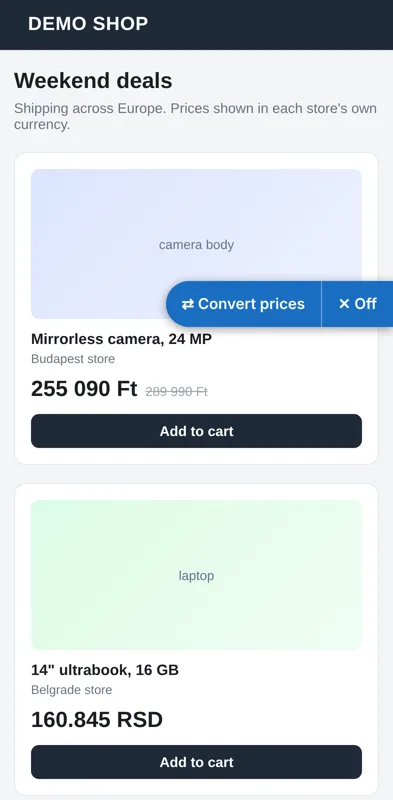
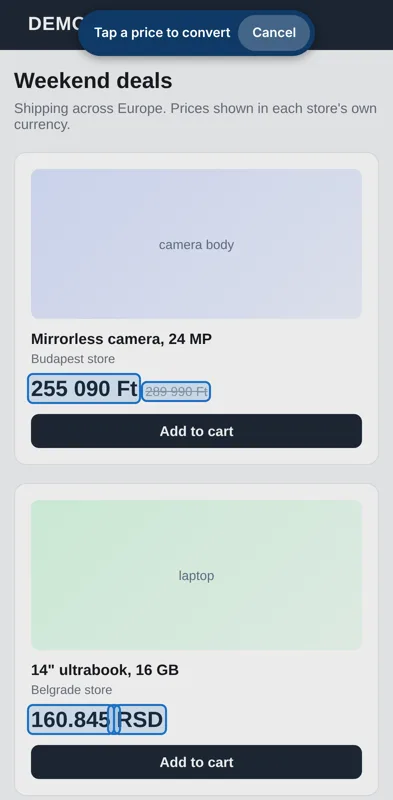
Phones cannot hover, and tapping a price would trigger the shop's own link. So the phone gets a slim tab on the screen edge that opens into Convert prices or Off. In convert mode prices are outlined and the extension takes the tap, so the page underneath never fires.
2 bugstests could not see
Test in a Real Browser Too
191 automated tests run on simulated pages. Rendering the real scripts in a real browser for the store screenshots caught two layout bugs they missed: the menu covering the price it converts, and a phone banner wrapping onto two lines. Both fixed before submission.
On a Phone
Firefox for Android, same code. The layout switches on its own when the device has no mouse.
How I Ran It
- Spec first, then build. Every change started as a written requirement and ended as a numbered finding or decision.
- Every build reviewed in Firefox before the next change was specified.
- Automated checks: 191 tests across price detection, the overlay, the phone flow, settings sync, rates and the off switch. Mozilla's own linter reports zero errors, warnings and notices.
- Store-ready: listing text, privacy policy, permission justifications and eight screenshots, written alongside the build.
What Comes Next
Free first, to earn installs on desktop and Android. A paid tier with near-live rates and card fee estimates comes once there is an audience, and a shop widget fits under SynkBase later.
Need someone who can take a product from requirements to a live release, and use AI to get there faster? I take freelance B2B contracts worldwide.